Play Minecraft with friends,
only you need the mod
Share your Minecraft world with friends anywhere, vanilla or modpack. Type /host and send them the address. They join from the normal multiplayer menu without installing anything.
Fabric mod for Minecraft 1.20.1, 1.21, 1.21.1, 1.21.11, 26.1, 26.1.1, 26.1.2, 26.2, 26.3. Made in Germany
484 players have used CraftProxy so far, 212 of them in the last 30 days.
Hosting takes one command
-
1
Install the mod
Put CraftProxy in your
modsfolder (Fabric). Only you, the host, need it. -
2
Type /host in your world
Open a singleplayer world and type
/hostin chat. CraftProxy opens a tunnel to our relay. -
3
Send the address
Your friends add the address as a server in the multiplayer menu and join.
✔ Tunnel active!
Share this IP with your friends:
Nova joined the game
Pixel joined the game
If your connection drops, the tunnel reconnects by itself, so you don't have to type /host again.
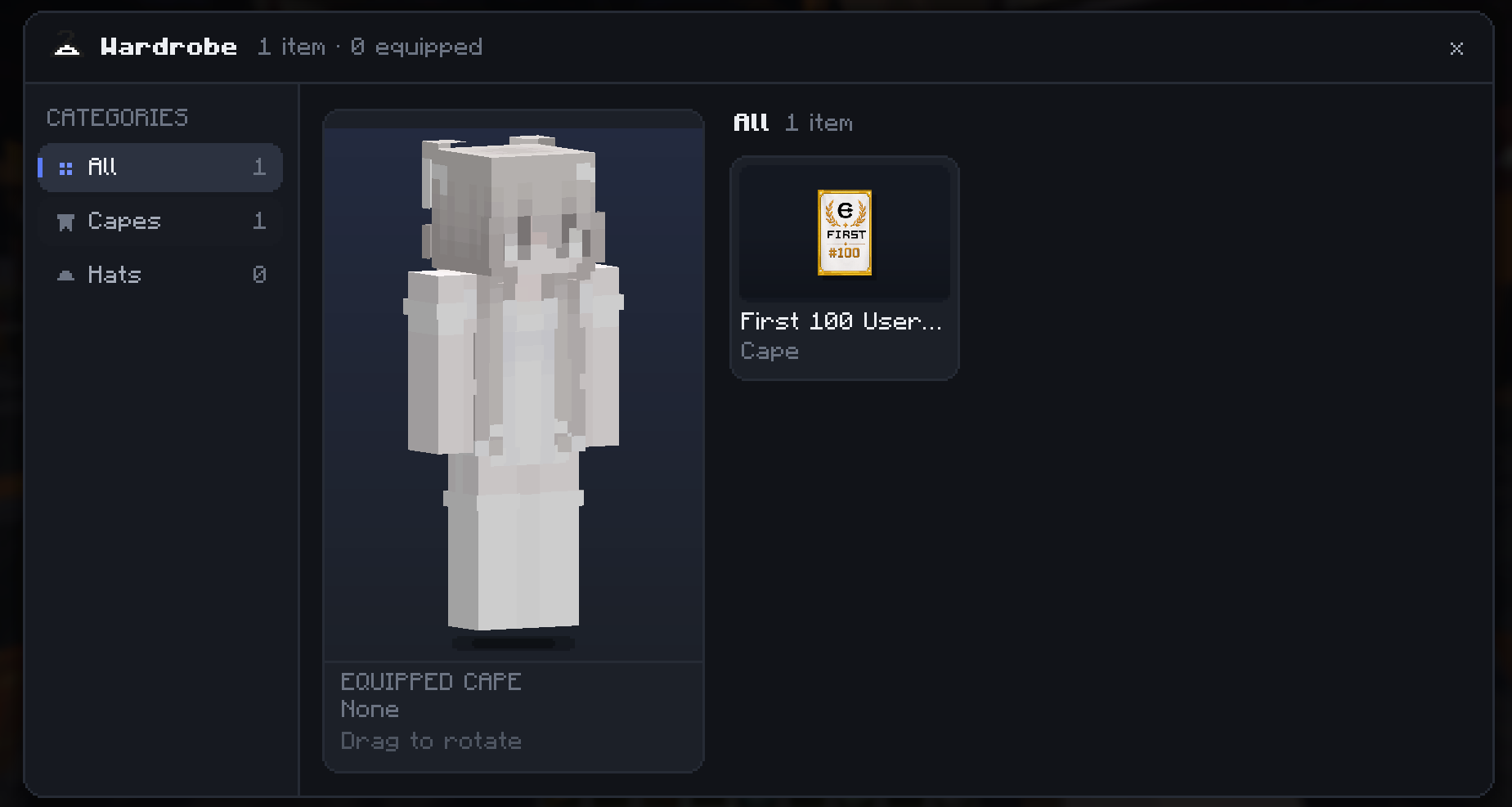
Capes and hats in the wardrobe
Press H or click Wardrobe in the pause menu to open your cosmetics. A 3D preview shows your own skin, which you can drag to rotate, and one click equips a cape or hat.
Other players with CraftProxy see your cape in the game. Players from the first days got the First 100 Users Cape.
Works with Fabric modpacks
Add the CraftProxy jar to your pack's mods folder and host the same way as in vanilla. Your friends need the modpack, not CraftProxy. The relay only forwards the connection and doesn't touch world generation or other mods.
Minecraft versions
-
Current, v1.2.2
1.20.1 1.21 1.21.1 1.21.11 26.1 26.1.1 26.1.2 26.2 26.3
Discord shows when you're in a world
While Discord is open, your profile shows your Minecraft version, whether you're in a world and how many players are in it. Your friends see when it's a good moment to join. The Discord button on the title screen takes you straight to our community server.

Compared with port forwarding and VPNs
The usual ways to play together need access to your router or a VPN that every player installs. CraftProxy needs neither.
| Feature | CraftProxy | Port forwarding | VPN (e.g. Hamachi) |
|---|---|---|---|
| Friends install nothing extra | ✓ | ✓ | ✗ |
| Your home IP stays hidden | ✓ | ✗ | Partly |
| No router settings | ✓ | ✗ | ✓ |
| Works behind CGNAT | ✓ | ✗ | ✓ |
| Join through the normal server list | ✓ | ✓ | ✗ |
Common questions
Do my friends need to install CraftProxy?
No. Only the host installs the mod. Your friends join with Minecraft Java Edition through the normal multiplayer menu. If you play a modpack, they need the same modpack, but not CraftProxy.
Is CraftProxy free?
Yes. Downloading CraftProxy and hosting your world with it is free.
Which Minecraft versions and mod loaders are supported?
The current version of CraftProxy is a Fabric mod for Minecraft Java Edition 1.20.1, 1.21, 1.21.1, 1.21.11, 26.1, 26.1.1, 26.1.2, 26.2, 26.3. Every version gets the same features.
Do I need to set up port forwarding?
No. CraftProxy opens an outgoing tunnel to our relay, so you never change your router settings. It also works behind CGNAT and mobile hotspots.
Can other players see my IP address?
No. Players connect to a CraftProxy address and the traffic goes through our relay, so other players never see your home IP.
Does it work with modpacks?
Yes. Add CraftProxy to a Fabric modpack. Friends need the same modpack, but not CraftProxy. CraftProxy runs on 1.20.1, 1.21, 1.21.1, 1.21.11, 26.1, 26.1.1, 26.1.2, 26.2, 26.3, so it fits most Fabric packs.
Can I chat with my friends in Minecraft?
Yes. If you both have CraftProxy, open the Social menu with I and pick a friend. You can write messages and send images, and they arrive even when you are not in the same world. The chat is shared with your CraftShot.net account, so the same conversations are on the website too.
How do I host a Minecraft world for friends?
Install CraftProxy (Fabric), open your singleplayer world, type /host in chat and send the address that appears to your friends. They add it as a server in the multiplayer menu and join.
Guides for playing together
- Play with friends Every way compared: LAN, putting your own world online, your own server and a rented server. Read the guide
- LAN over the internet Open your LAN world to friends on other networks without port forwarding, even behind CGNAT. Read the guide
- Modpacks with friends Play a Fabric modpack together without renting a server: match versions, host, fix join errors. Read the guide
- Free Minecraft server When you need a free 24/7 server and when your own world is enough. Read the guide
Download CraftProxy
Put the jar in your mods folder, start Minecraft and type /host in your world.
Minecraft 1.20.1, 1.21, 1.21.1, 1.21.11, 26.1, 26.1.1, 26.1.2, 26.2, 26.3, Fabric
- Source code on GitHub
- Discord
- Made by the creators of CraftShot.net
World Invite
Luna invited you to "Survival SMP"
Friends, chat and invites in one menu
The first time, sending the address is enough. If you play together often, add each other in the Social menu: press I in-game, on the title screen or in any other menu.
The Social menu needs CraftProxy on both sides. Joining by address always works without it.